SoloVoice turns what you sing or scat into an expressive, humanized real-time MIDI performance on any instrument you point it at — while a live, jazz-literate chord map shows you exactly what to solo over. Put a SoloVoice Satellite in front of every instrument in your rig, and that one voice conducts a whole orchestra through the changes.
One-time purchase · two editions from $149 · 14-day money-back · macOS VST3
One take, no edits: a single voice, tracked and humanized in real time by SoloVoice, conducting a thirteen-piece SWAM Big Band through Divisimate Core with a SoloVoice Satellite ahead of every instrument. Both plug-ins and the band template are in the box — see "The band" below for what else the rig needs.
SoloVoice never composes or generates a solo — the line is always yours. It converts, humanizes, and helps you stay in-key.
SoloVoice tracks your own monophonic line — voice, EWI, or any mic/controller input.
Breath-shaped velocity and expression are derived in real time — not a flat, robotic MIDI output — and your pitch can snap into the current chord or scale.
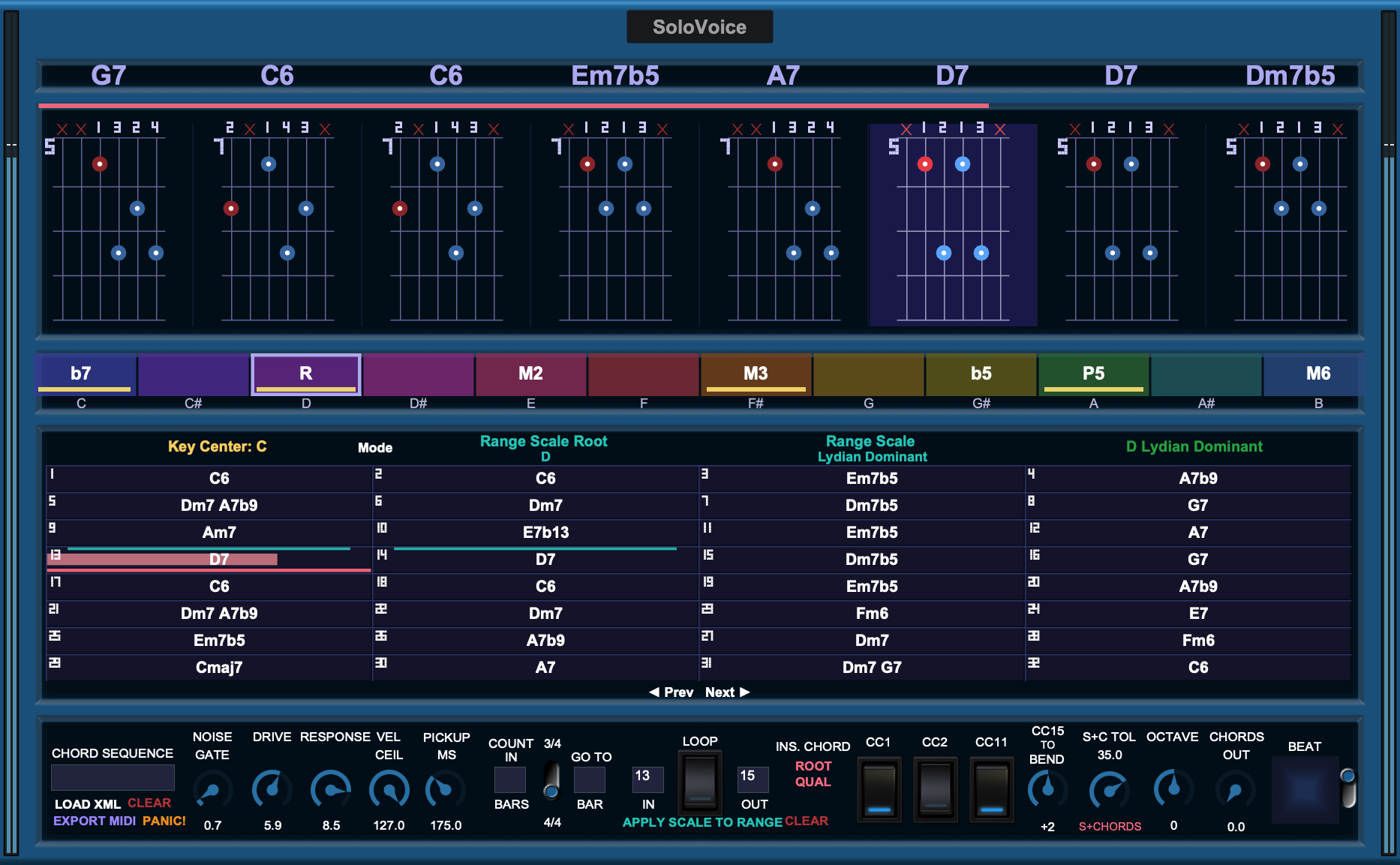
A live chord chart, guitar voicings, and a colour-coded chroma strip show exactly what's "inside" over each chord — and the same palette is announced to every instrument behind a SoloVoice Satellite.
Musicians who already have the sound in their head — and the rig on their desk.
Export your BIAB chart as MusicXML, sync PatchWork to BIAB's clock, and solo over your own arrangement — in key, with a real horn sound, live.
You already own the band. Add a SoloVoice Satellite ahead of each instrument and one sung line drives the whole section through the changes, chord by chord.
A laptop, an interface, a mic and Blue Cat's PatchWork. One preset per song; a footswitch to change it. No DAW on stage.
The melody in your mind's ear, straight from your voice into a modelled instrument — without a keyboard between you and it.
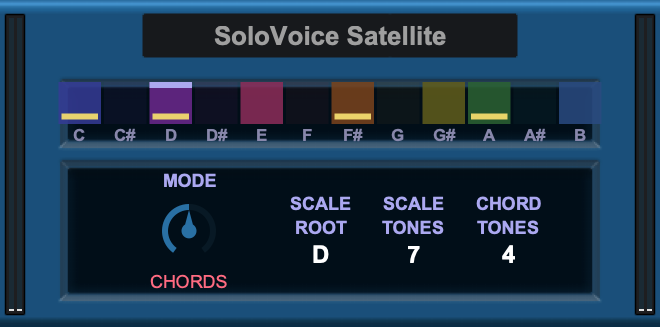
Every time the harmony changes, SoloVoice announces the current scale, chord tones and root to the rest of your rig. The SoloVoice Satellite — a second, tiny plug-in included with every license — sits ahead of any instrument and snaps that instrument's notes to the same live palette. Put one in front of each chair of a SWAM Big Band voiced by Divisimate Core, and your sung line comes out of thirteen instruments harmonically correct on every chord, every override, every loop wrap. Each Satellite has one control: whether that instrument follows the scale, the chord tones, or both.
The PatchWork big-band template ships wired and ready. You supply Divisimate Core and the SWAM instruments (Nextmidi's own SWAM Big Band template for Core is the rig it was built on). Nothing in the protocol knows what a trumpet is — the same Satellite conducts strings, a harmony synth, or a single second instrument.
The core engine behind both the single-instrument and full-band setups.
Note velocity and expression are derived from your breath/envelope in real time — not the flat, robotic velocity-127 output of typical audio-to-MIDI converters.
A live chord chart, 4-note guitar voicings, and a color-coded scale-degree ribbon show you what's "inside" over the current chord, drawn from real jazz vocabulary.
Land on the scale, the chord tones, or both — with a tolerance knob that grants chromatic reach when you sing it deliberately and pulls you home when you don't.
Type a chart as written on your lead sheet, tensions and all, or load a MusicXML export from Band-in-a-Box or iReal Pro. Paint a scale over any range; fill a blank bar with Insert Chord.
An expression pedal rides vibrato; a second pedal bends up, swings either way, or — set to −2 — gives you a horn player's scoop into every note.
Two VST3 plug-ins for macOS, at home in Blue Cat's PatchWork on stage or inside any VST3 host in the studio. Chords Out and MIDI export hand the changes to a scoring engine or your DAW's chord track.
Tap a marker to see what each part of SoloVoice does. Every one of these is a knob you'll reach for in the first hour.
Your chart as a row of four-note guitar voicings, root in the bass. The highlighted diagram is "you are here" — even inside a bar with four chords.
One plug-in, one control. Its lamps show the palette the conductor just announced — lit lamps are scale tones, gold bands are chord tones, the bright edge is the note sounding through this chair right now. MODE decides which of those this instrument obeys: SCALES for the full colour, CHORDS for the tightest, most consonant section sound, S+CHORDS for both.
Insert one per instrument, set MODE once, save the rig. It follows every override you make on the conductor without a click.
Real takes, real mic, no edits to the tracking.
The full walkthrough. Every control, chaptered, from first launch to a painted blues chorus.
Conducting the band. One sung chorus through thirteen SWAM instruments — watch the lamps repaint at every bar line.
Paint a scale over a section. A twelve-bar blues, rendered with the blues idiom instead of the textbook pairings.
The chroma strip. Find the note by ear, then find the scale that owns it.
The manual is built into both plug-ins — press ? in the toolbar — and it's here too, as a web page or a PDF, so you can read it before you buy.
Read the manual online ▸ Download the PDF ▸No subscription. Buy once, own it.
SoloVoice
$149
The conductor — sing any single instrument
SoloVoice Orchestra
$199
Conductor + Satellite — conduct a whole band
Start with SoloVoice and add the band whenever you like — the $50 Orchestra upgrade flips your license to unlock the Satellite. No reinstall, no new download.
No — SoloVoice never composes or generates a musical line. It converts, humanizes, and optionally snaps your own sung or scatted performance, and shows you the harmonic map to solo against. The melody is always yours.
A Mac (Apple Silicon or Intel) on a current macOS, a VST3 host, an audio interface and a microphone. Blue Cat's PatchWork is the recommended host — standalone on stage, or as a plug-in inside your DAW — and the shipped templates are PatchWork presets. SoloVoice makes no sound of its own: you need an instrument on the other side, ideally one that responds to expression (CC11), such as a SWAM wind or brass.
Yes — both plug-ins are VST3 instruments and load in any VST3 host. The recommended way is still to host SoloVoice in PatchWork and let your DAW send MIDI Clock to PatchWork: that keeps the transport, looping and sync in one place, and it's the setup every video shows. v1 is VST3 and macOS only — no AU, AAX or standalone app.
Not to use SoloVoice — out of the box it drives one instrument of your choice, and the Satellite will conduct a second, third or fourth instrument directly. The thirteen-piece big band in the videos uses Divisimate Core as the voicing engine and SWAM instruments as the players; both are sold separately by their makers, and the included PatchWork template is built for exactly that pairing. Divisimate Core specifically — Divisimate 2 lacks the per-port channel arrangement the template relies on.
Your key arrives by email a few minutes after purchase. Paste it into SoloVoice's chord field, be online for that one moment, and you're done — no account to log into, no check-ins afterwards, and the Satellite picks the license up automatically. One license covers up to three of your own machines, and you can move it yourself. There is no separate trial — instead every purchase carries a 14-day, no-questions money-back guarantee, so you can put SoloVoice through its paces on your own rig and refund it if it is not for you.
Yes — load a MusicXML file exported from Band-in-a-Box, iReal Pro, or most notation software, and SoloVoice builds the chord track, voicings, and scale-degree guide automatically.
Every purchase is covered by a 14-day, no-questions money-back guarantee. If SoloVoice is not right for you within two weeks of buying, email us and we will refund you in full. (There is no time-limited trial build — the return window is your risk-free way to try it.)
Email [email protected] from the address you bought with, and include your license key if the question is about activation or moving machines. You will hear back from the developer, not a ticket queue.